


Offline Music Player: Play MP3
4.55.36K Reviews
App Specs
- Version
- 1.02.165.0923
- Updated On
- License
- Free
- Downloads
- 50,000,000+
- Developer
- Dairy App & Notes & Audio Editor & Voice Recorder
- Categories
- Music & Audio
- Platform
- Android, iOS
Screenshots
 Analysis by AppCompare
When I choose an offline music player, I care about more than whether it can start a track without a signal. I want to know what I’m actually choosing: a simple way to listen to files I already have, or a service that expects me to stream, sign in, and build a library around it. Offline Music Player: Play MP3 is aimed at local listening, which makes it appealing for commutes, travel, and places where mobile data is unreliable. My main advice is to approach it as a player for your own music collection, rather than as a replacement for a streaming subscription.
What the offline-first approach means in practice
Offline playback is useful only when the music you want is available on the device. That distinction matters: this kind of player suits people who already keep audio files locally, while a streaming app is usually easier if you want to discover and play a vast catalog without managing files. I find the local-library approach more predictable for a saved playlist or a particular album, but it does ask you to keep your collection organized enough to find what you want.
The app is a free music-and-audio player from Dairy App & Notes & Audio Editor & Voice Recorder. It has a 4.5 average from around 366,000 ratings and has been installed over 50 million times. Those figures suggest it has reached a broad audience, but they don’t tell me whether it fits my listening habits; the useful test is whether my own files appear and play the way I expect.
Trust, choices, and sensible checks
I’m careful whenever an app needs access to a music library, because the choice affects both convenience and privacy. Before importing tracks, I’d read the permission request shown on my device and consider whether it makes sense for the task I’m asking the app to do. I wouldn’t treat offline playback as proof of any particular data practice. If privacy is a deciding factor, check the app’s current permission controls and the information presented in the store before installing.
There are also ordinary, practical choices that keep a local library manageable. I’d start with a small folder or a few albums, confirm that the tracks appear correctly, and only then bring in more. That makes it easier to spot missing tags, duplicate versions, or files that do not play as expected without turning the first launch into a long cleanup session. If you listen on a shared device, it is worth thinking about which files you want available there before importing everything.
Getting Started with Ease
First things first, downloading and setting up Offline Music Player: Play MP3 is a breeze. Available on both Android and iOS, the app takes up minimal space, which is a blessing for those of us with perpetually full storage. Once installed, I was greeted with a clean and intuitive interface that even a tech newbie could navigate without breaking a sweat.
Design and Interface
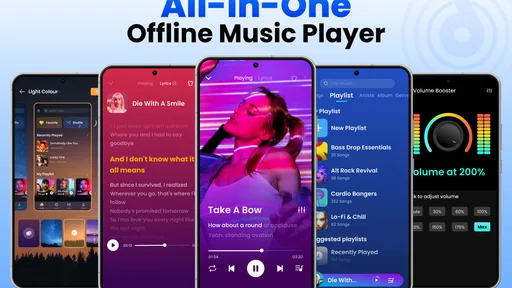
The design of the app is simple yet effective. The main screen displays my music library in a way that's organized and easy to browse. I loved how the app uses vibrant colors to highlight different sections, making it visually appealing without going overboard. Navigating through playlists, albums, and artists felt smooth, thanks to the responsive interface.
Worth Reading Before You Choose

Flipboard Shows What News Apps Must Do Beyond the Feed

Switching to Android Auto Means Rethinking Your Driving Routine

Google Calendar Makes a Crowded Week Easier to Manage

Ludo King Makes the Most of the Minutes Between Plans

Baby Panda World Brings Quick Play to Modern Phones, but Its Game Library Feels Busy

ESPN’s Live Game View Makes Following Close Games Easier
Features That Stand Out
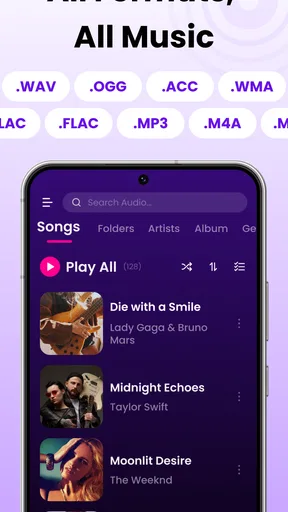
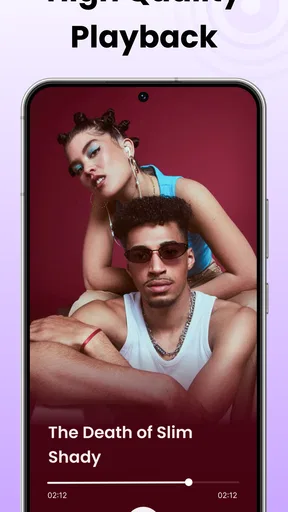
One of the standout features of the app is its ability to play music offline. Yes, you heard that right. No more buffering or data charges. I could easily import my existing music library into the app, and it played all my favorite tracks without a hitch. It supports a variety of file formats, so whether your collection includes MP3, WAV, or FLAC files, this app has got you covered.
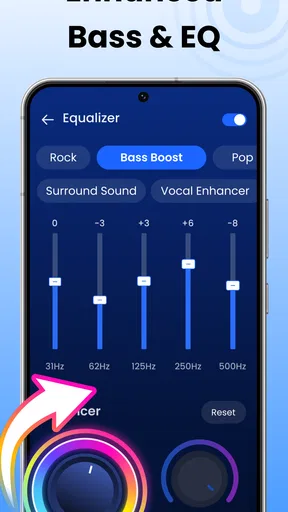
Another cool feature is the built-in equalizer. I had a blast tweaking the sound settings to match my mood and headphones. Whether I wanted to pump up the bass or enjoy a more balanced sound, the equalizer delivered with aplomb.
Performance and Usability
In terms of performance, the app runs like a dream. It didn't crash or lag, even when I was multitasking with other apps in the background. The battery consumption was minimal, which is a huge win for anyone who's constantly on the move. I also appreciated the app's ability to automatically organize music by artist, album, and genre, saving me the hassle of manually sorting through my collection.
Everyday listening without a connection
A realistic use for me is preparing a commute playlist at home, then listening with my phone in airplane mode on the train. That separates two jobs that are easy to confuse: getting music onto the device first, and playing it later. I’d check that the chosen tracks are present and playable before leaving, especially if the trip matters or the connection is likely to drop. An offline player can’t rescue a song that was never stored locally.
This workflow also helps when traveling. I can keep a few familiar albums ready rather than relying on a connection at every stop. The trade-off is that local listening requires some advance planning and storage space for the files. If I want constant discovery or to switch spontaneously between unfamiliar artists, a streaming service is more convenient; if I want a dependable set of tracks without using mobile data for playback, a local player is the more direct tool.
Small library habits that prevent friction
One useful habit is to tidy names and tags before importing a large collection. Since the library is organized around artists, albums, and genres, consistent file details make those views more helpful. If an album is split across folders or its tracks have inconsistent artist labels, the library can feel less orderly than the interface itself. I’d fix obvious metadata problems at the source when possible rather than expecting the player to guess what I meant.
I’d also keep a short test playlist for checking new files and headphones. A few tracks with different recording styles make it easier to judge whether an equalizer adjustment is helping or merely making everything louder. Equalizer changes are personal, and a setting that sounds exciting with one pair of headphones may muddy vocals with another. I’d start with small adjustments and return to a neutral sound if familiar songs begin to feel unbalanced.
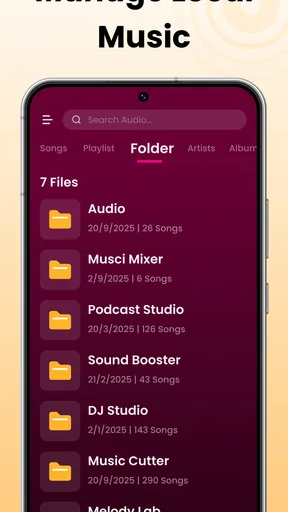
Another practical trade-off is the difference between a player’s library organization and a file manager’s folder structure. The app’s artist and album views are convenient for browsing, but people who sort music by project, mood, or custom folder names may prefer to manage those files separately and use the player mainly for playback. Neither approach is automatically better; the right one depends on whether you search by album and artist or remember exactly where you saved a track.
Who will get the most from it
I’d recommend this app to someone with a collection of audio files who wants a straightforward way to browse and listen without depending on a live connection. It also makes sense for listeners who like adjusting playback with an equalizer and prefer familiar albums over an endless stream of recommendations. Its Teen content rating is worth noting for households choosing apps for younger users, while parents should still make their own decision about what is suitable on a shared device.
I’d be less inclined to recommend it to someone who doesn’t keep music files on their phone, expects a built-in catalog of songs to search, or wants automatic access to a streaming library. Those are different needs, and a subscription-based music service may suit them better. It’s also not the best choice for someone who wants every aspect of a music collection handled without any file preparation: the more carefully arranged the local files are, the more useful the library organization is likely to feel.
Cost, compatibility, and version context
The app is free to install, with in-app purchases listed from $1.99 to $39.99 per item. I’d treat that as a reason to inspect any purchase screen carefully rather than assume that every option is necessary for basic listening. If all you need is offline playback of your own collection, first try the core workflow and decide whether the available experience already does the job before paying for anything.
Its current version is 1.02.122.0212, and it requires Android 6.0 or later. That makes the operating-system requirement a quick compatibility check for Android users; iPhone owners should check the current app page on their device for their platform’s requirements. As with any app, I’d install updates through the official store and review the visible choices during setup rather than granting access without reading the prompt.
Performance and Usability
In terms of performance, the app runs like a dream. It didn't crash or lag, even when I was multitasking with other apps in the background. The battery consumption was minimal, which is a huge win for anyone who's constantly on the move. I also appreciated the app's ability to automatically organize music by artist, album, and genre, saving me the hassle of manually sorting through my collection.
Personal Experience and Verdict
After using Offline Music Player: Play MP3 for a week, I can confidently say it's a keeper. The freedom of enjoying music without internet woes is liberating. The app does an excellent job of delivering what it promises, and it does so with style and efficiency. Whether you're a casual listener or a music enthusiast, this app meets the mark.
So, if you're on the hunt for a reliable music player that works offline, I'd suggest giving this app a shot. It's got the features, the performance, and the user-friendliness that make it a solid choice. Happy listening!
Pros
- No internet needed for playback
- User-friendly interface design
- Supports multiple audio formats
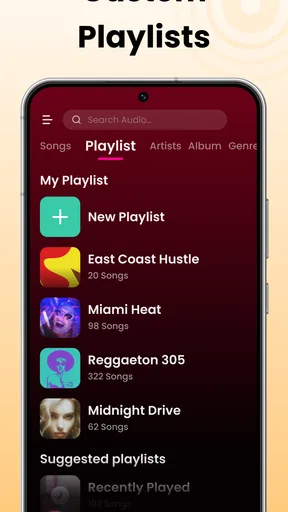
- Customizable playlists available
- Efficient battery usage
Cons
- Limited equalizer settings
- Ads in the free version
- No cloud sync feature
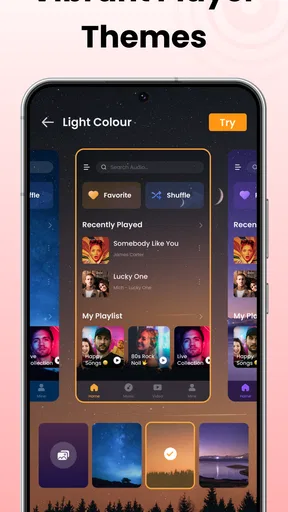
- Limited theme customization
- Occasional crashes reported
FAQs for Offline Music Player: Play MP3
How do I import my music files into Offline Music Player?
To import music files into Offline Music Player, you can use multiple methods such as transferring files via USB, using cloud storage services like Google Drive or Dropbox, or by downloading music directly from the in-app browser. Once transferred, the app will automatically scan and add them to your library.
Does Offline Music Player support all audio file formats?
Offline Music Player supports a wide range of audio file formats including MP3, WAV, AAC, and FLAC. This ensures that you can play almost any music file you have. However, it’s always good to check if your specific format is supported before downloading.
Can I create and manage playlists within the app?
Yes, Offline Music Player allows you to easily create and manage playlists. You can add songs to playlists, reorder tracks, and delete or rename playlists. This feature makes it convenient to organize your music according to different moods or occasions.
Is an internet connection required to use Offline Music Player?
No, an internet connection is not required to play your music once it has been downloaded or transferred into the app. However, you will need internet access to download music files from online sources or to use any cloud storage features available within the app.
Are there any in-app purchases or ads in Offline Music Player?
Offline Music Player is free to download, but it may contain ads that can be removed through a one-time in-app purchase. This purchase might also unlock additional features like enhanced equalizer settings or advanced playlist management options, providing a more premium experience.


